
Additional material: High throughput RNA-sequencing
Last updated on 2025-11-16 | Edit this page
Overview
Questions
How does high throughput RNA-sequencing work?
What is a fastq file?
Objectives
- Explain what RNA-seq is.
- Provide an overview of the procedure to go from the raw data to the read count matrix that will be used for downstream analysis.
This episode is based on the course Omics data analysis.
RNA-seq library preparation
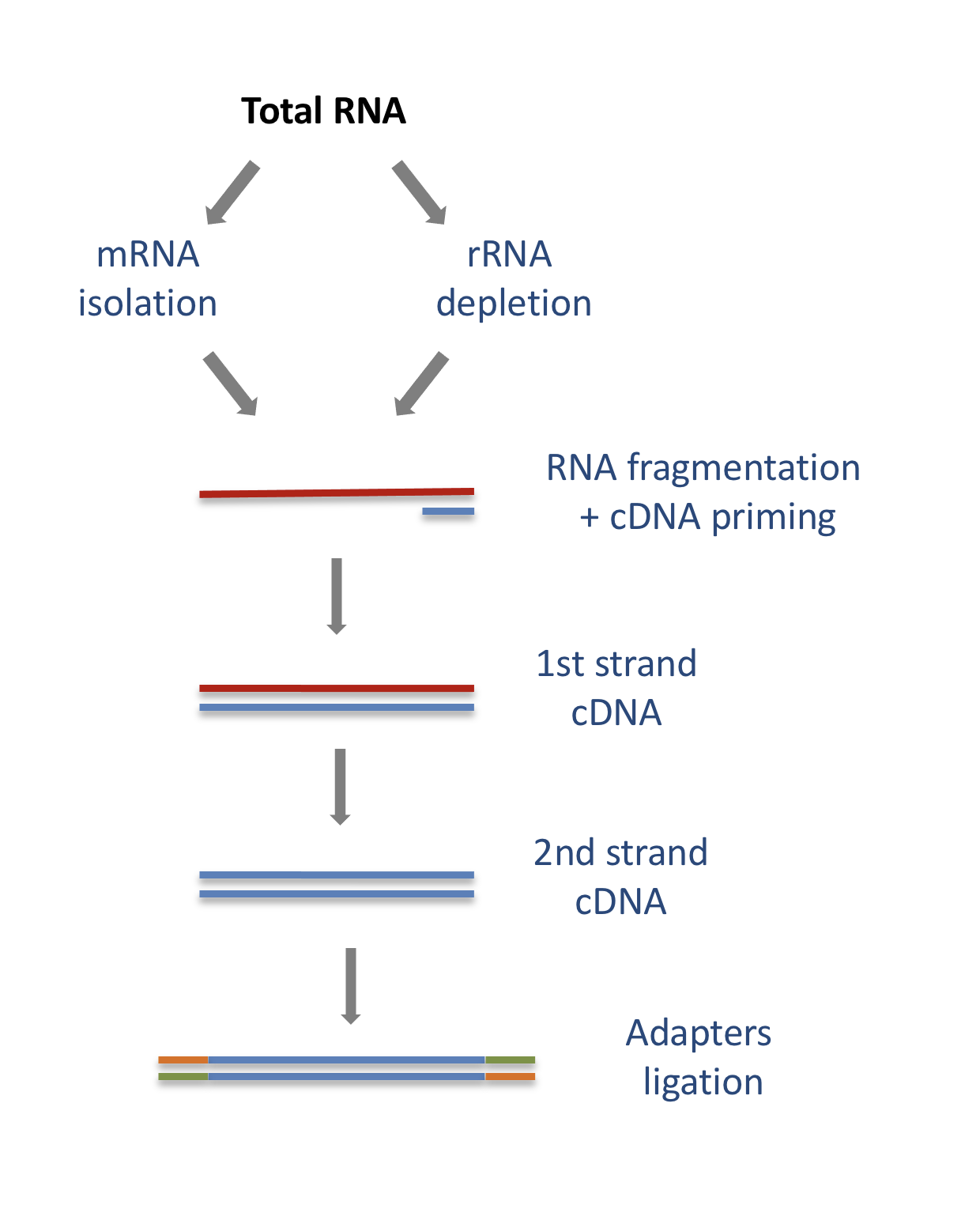
The starting point of a RNA-seq experiment is the cDNA library preparation. RNA is first isolated from cells and purified to remove ribosomal RNA which constitute the majority of total RNA. This can be done by extracting poly(A) RNA or by depleting rRNA. Purified RNA is then fragmented, reverse transcribed and adapters are ligated to both extremities to allow for amplification and sequencing.
Stranded versus unstranded libraries
The library preparation presented above corresponds to an unstranded protocol.
As both cDNA strands will be amplified for sequencing, about half of the reads will be sequenced from the first cDNA strand, and half of the reads will be sequenced from the second strand cDNA. But we won’t know which strand was sequenced! So we lose the information about the orientation of the transcript.
This can be avoided by using a stranded protocol. In this case, dUTPs are added during the 2nd strand cDNA synthesis and the newly synthetized cDNA strand is degradated after the ligation step. This allows to infer the transcript orientation because only the first cDNA strand will be sequenced. Indeed, if the sequence of the read corresponds to the the sense strand of DNA, it means that the gene was originally transcribed in a sense orientation. On the contrary, if the read is complementary to the sense strand of DNA, it means that it was originally transcribed in antisense.
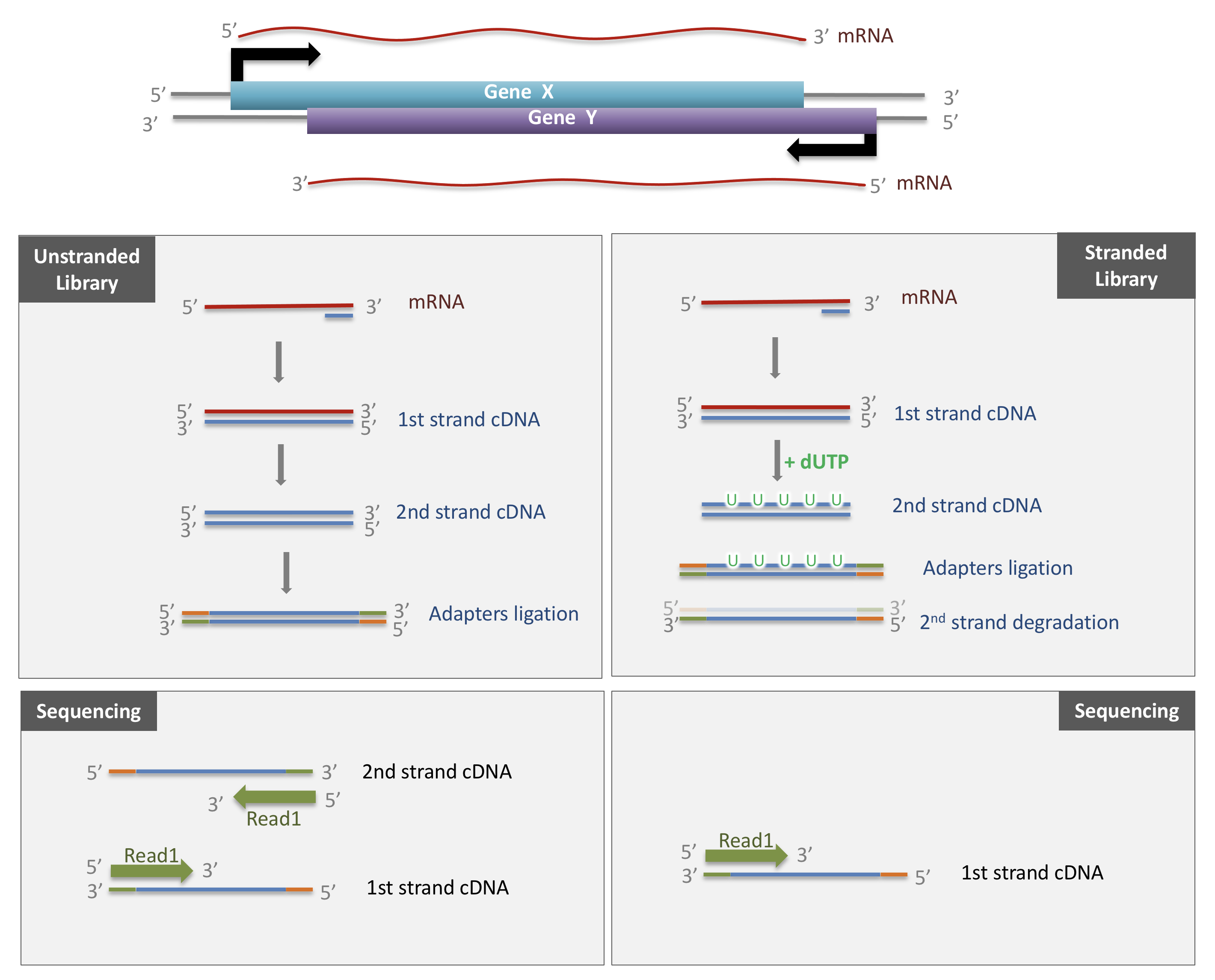
Strand-specificity leads to lower number of ambiguous reads.
Sequencing
SE vs PE sequencing
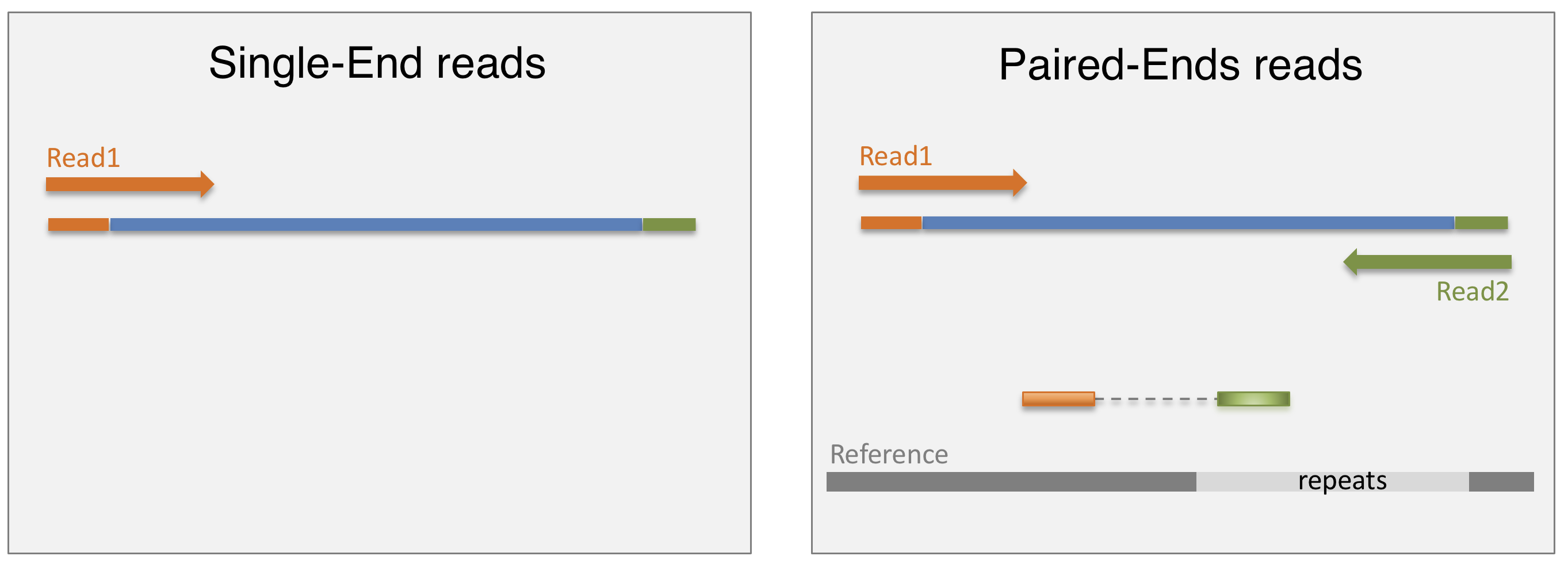
Once the library is ready, molecules from the library are sequenced in a high throughput manner to obtain short sequences from one end (single-end sequencing) or both ends (pair-end sequencing). Single-end sequencing is cheaper, but Paired-end sequencing improves the ability to localise the fragment in the genome and resolve mapping close to repeat regions, resulting in less multimapping reads.
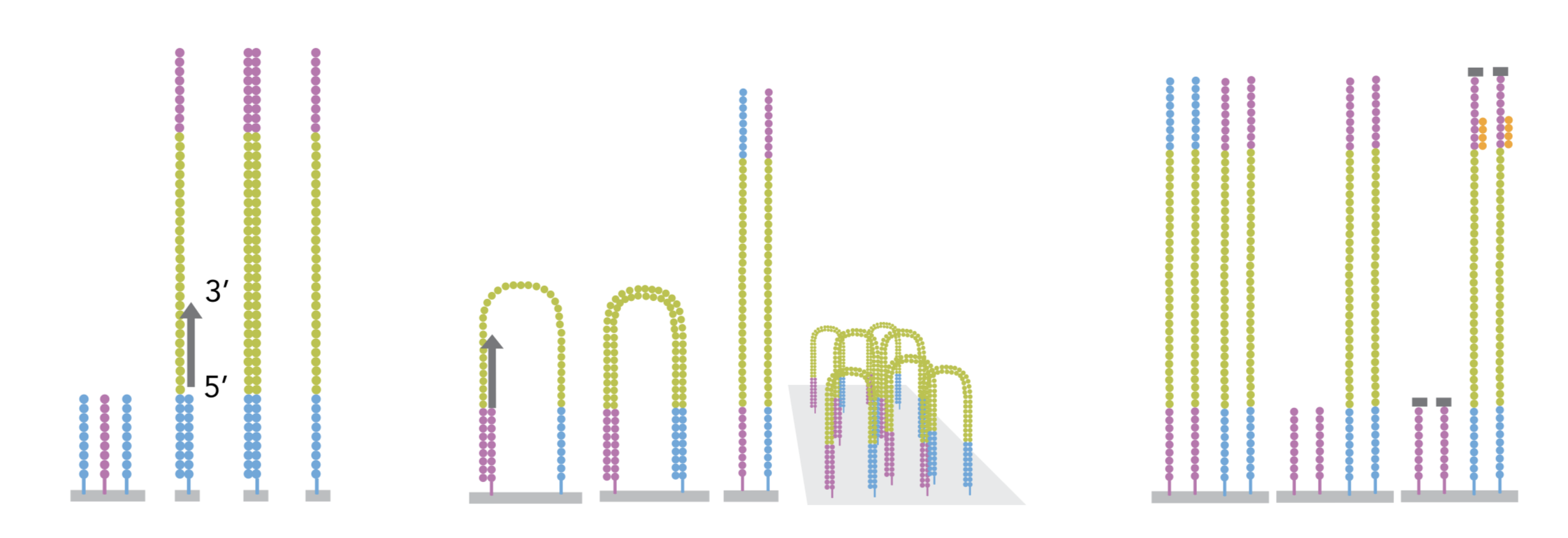
cluster amplification
The sequencing is done by a cluster amplification process.
The library preparation is hybridized to a flow cell coated with immobilized oligonucleotides that serve as support to hold the DNA strands in place during sequencing. The templates are copied from the hybridized primers by 3’ extension using a high-fidelity DNA polymerase. The original templates are denatured, leaving the copies immobilized on the flow cell surface.
Immobilized DNA template copies are then amplified by bridge amplification. The templates loop over to hybridize to adjacent oligonucleotides. DNA polymerase copies the templates from the hybridized oligonucleotides, forming dsDNA bridges, which are denatured to form two ssDNA strands. These two strands loop over and hybridize to adjacent oligonucleotides and are extended again to form two new dsDNA loops. The process is repeated on each template by cycles of denaturation and amplification to create millions of individual, dense clonal clusters containing ~2,000 molecules.
Each cluster of dsDNA bridges is denatured, and the reverse strand is removed by specific base cleavage, leaving the forward DNA strand. The 3’-ends of the DNA strands and flow cell-bound oligonucleotides are blocked to prevent interference with the sequencing reaction. The sequencing primer is hybridised to the Illumina adapter. Clusters are ready for sequencing.
The sequencing process is done by synthesis. A polymerase adds a fluorescently tagged dNTP to the DNA strand (only one base is able to be added per round due to the fluorophore acting as a blocking group, but the blocking group is reversible). Each of the four bases has a unique fluorophore, and after each round, the machine records which base was added. The fluorophore is then washed away and the process is repeated.
For a dynamic view of the cluster amplification process, watch the Illumina video.
fastq files
The sequence data generated from the sequencer are received in text
files called fastq files. For a single-end run, one fastq
file is created for each sample. For a paired-end run, two separated
fastq files are generated, each containing sequences from one end.
What does a FASTQ file look like?
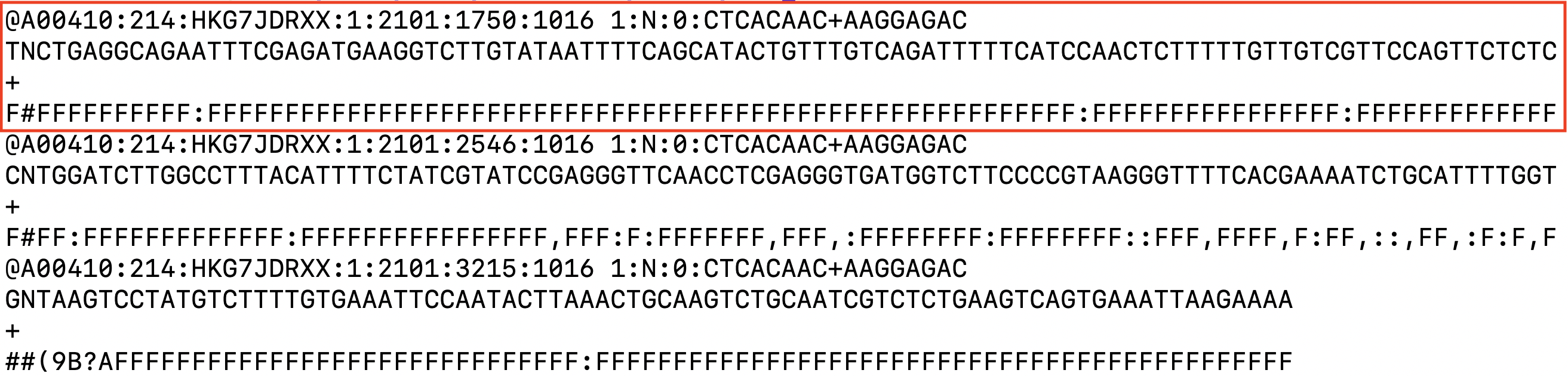
Each entry in a fastq file consists of 4 lines:
- A sequence identifier (by convention preceded by ‘@’) with information about the sequencing run
- The sequence
- A delimiter, always starting by the sign ‘+’
- The base call quality scores. These are Phred scores, encoded using ASCII characters to represent the numerical quality scores. Each character is assigned a quality score between 0 and 40. Quality scores represent the probability that the corresponding nucleotide call is correct.

Overview
Questions
What do you think of the quality of the last sequence presented in the fastq file above?
Objectives
- Explain what RNA-seq is.
- Provide an overview of the procedure to go from the raw data to the read count matrix that will be used for downstream analysis.
Processing pipeline
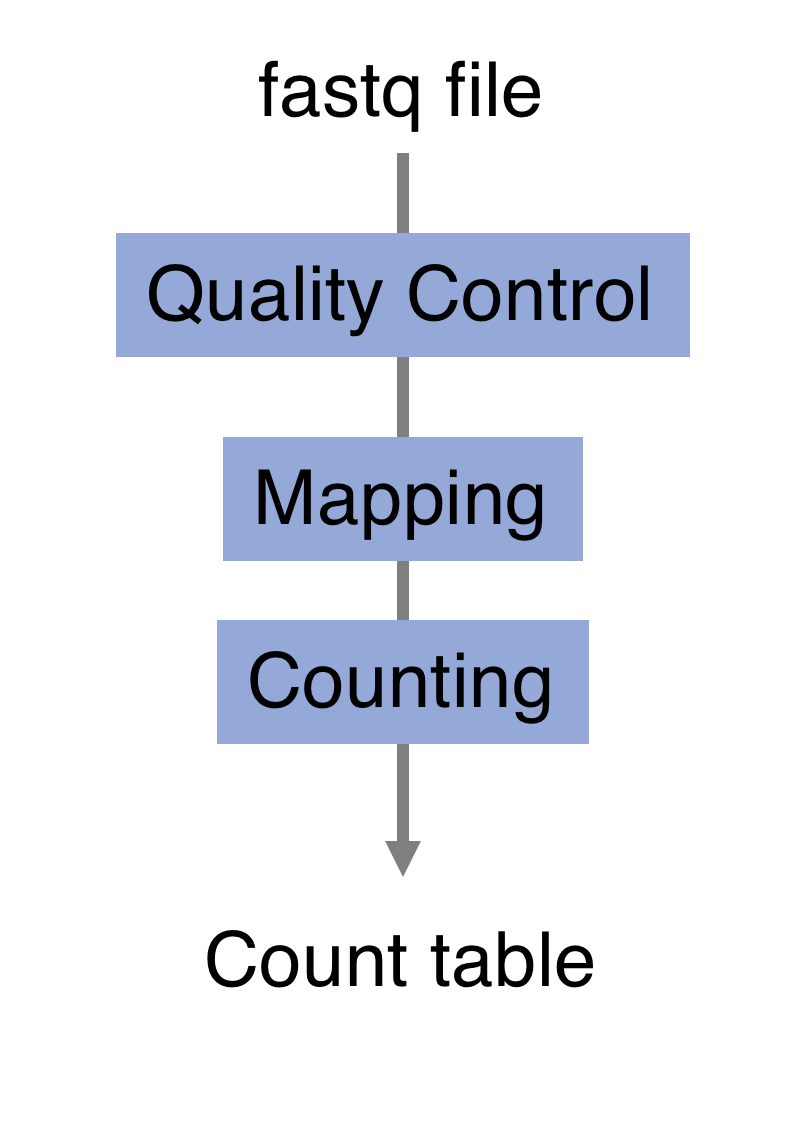
The raw reads from fastq files will need to pass through a different tools to yield ultimately a count table, representing a snapshot of individual gene expression levels. The execution of this set of tools in a specified order is commonly referred to as a pipeline.
Quality control
Of course, no one will analyse the sequences from the fastq file one by one to check their quality… Rather, a software called FastQC can be used. Then, another program such as Trimmomatics can help to clean the reads.
- FastQC
FastQC allows to analyse different features of the reads and generates a report that includes several diagnostic plots to highlight any problem the data may have.
FastQC is run from the command line:
Discussion:
Try to interpret the different plots of this fastQC report from a real RNA-seq fastq file.
Another report corresponding to bad quality data can be used as a point of comparison.
- Trimmomatics
FastQC gives a global vision the quality of the sample. If it is not optimal, it is advisable to use Trimmomatics software to filter poor quality reads and trim residual adapters.
Trimmomatics has a variety of options to clean the reads. Read the manual for more information. However, a command for Trimmomatics could look something like the command below. In this case it would perform adapter removal, and perform a scan of the read with a 10-base wide sliding window, cutting when the average quality per base drops below 20.
$ java -jar trimmomatic.jar \
  PE \                                  # paired-end
  -threads 4 \                          # number of threads
  SampleName_1.fastq \                  # fastq file for fw reads
  SampleName_2.fastq  \                 # fastq file for rev reads
  SampleName_1_clean.fastq \            # clean fastq for fw reads
  SampleName_1_unpaired.fastq \         # fastq for unpaired remaining fw reads
  SampleName_2_clean.fastq \            # clean fastq for rev reads
  SampleName_2_unpaired.fastq \         # fastq for unpaired remaining rev reads
  ILLUMINACLIP:TruSeq3-PE.fa:2:30:10 \  # cut adapter from the read.
SLIDINGWINDOW:10:20 # sliding window trimmingDiscussion:
How could you check that the trimming performed well?
Alignment
Next step is to map the reads to determine where in the genome the reads originated from. Many different aligners are available such as HISAT2, STAR, BWA, Salmon, Subread… There is no gold standard, but some tools are better suited for particular NGS analyses [@Baruzzo:2017]… In the case of RNA-seq, it is important to use an aligner able to handle spliced reads.
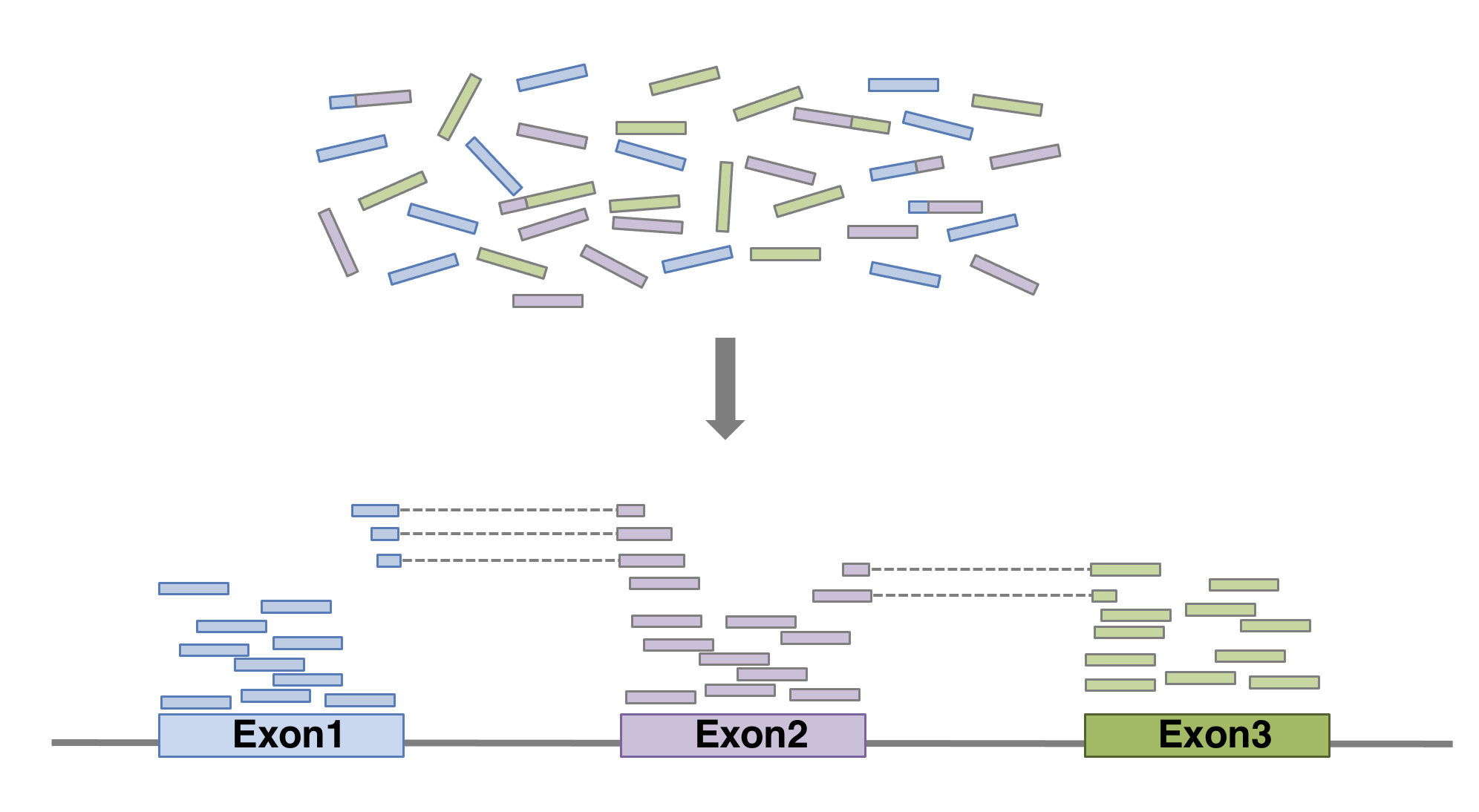
Here we show an example of what the command could look like when
using HISAT2
aligner, launched with default parameters. In this basic configuration,
mandatory parameters are of course the fastq file(s) and the sequence of
the genome on which the reads have to be aligned. In practical, the
genome’s sequence is not given as it is but in an indexed form 1. Of course
many of other parameters can be fine tuned (see the manual for
more details). The alignment output file data is a sam file
(see below).
$ hisat2 \
  -p 6 \                        # number of threads
  -x genome_index \             # index for the reference genome
  -1 SampleName_1_clean.fastq \ # clean fastq_file for fw reads
  -2 SampleName_2_clean.fastq \ # clean fastq_file for rev reads
  -S SampleName.sam             # sam file name
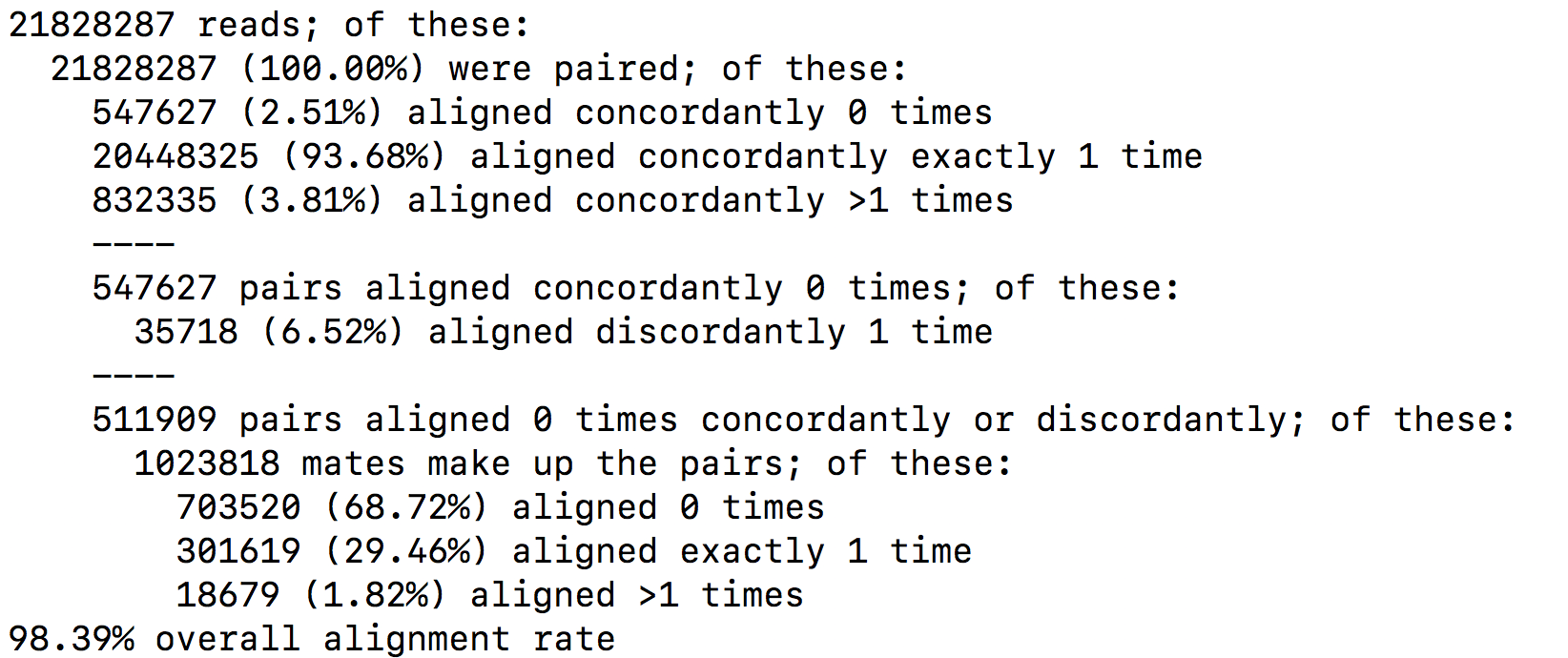
It is recommended to pay attention to the HISAT2 report to check the alignment rate. For a PE-end alignment it could look like this:
SAM format
The SAM format is a generic format for storing large nucleotide sequence alignments. In a SAM file, each entry gives the alignment information for a single read. Each entry has 11 mandatories fields for essential mapping information and a variable number of other fields for aligner specific information. An example of few entries from a SAM file is displayed below.
OUTPUT
DRR016707.26395247	147	1	19626495	60	101M	=	19626490	-106	GTAACAATGTTATCAGTAATGCTTTAAACTCCAGCACCTGGTTATGCATTTGAAACCAAGTCTGTTTCTTGTTTTGTATTTTCTCTCTGGAAGTTGTAAGG	DDDDDDDDDDDDDEEEEEEEFFFFFFHCHHHJJJHHJJJJJJJJJJJJIHFJJIHJJJJJJJJJJJJJJJJJJJJJJJJJJJJIJJJJHHHHHFFFFFCCC	AS:i:0	XN:i:0	XM:i:0	XO:i:0	XG:i:0	NM:i:0	MD:Z:101	YS:i:0	YT:Z:CP	NH:i:1
DRR016707.26395247	99	1	19626490	60	101M	=	19626495	106	CTTCTGTAACAATGTTATCAGTAATGCTTTAAACTCCAGCACCTGGTTATGCATTTGAAACCAAGTCTGTTTCTTGTTTTGTATTTTCTCTCTGGAAGTTG	CCCFFFFFHHHHHJIJJJJIJJJJJJJJJJIJJJJJJJJJJJJJJJHHIHIJJJIJJHIJJJIIIIIIJGIJJJJDHJJJHHHHHHHFFFFFFEDACEEDD	AS:i:0	XN:i:0	XM:i:0	XO:i:0	XG:i:0	NM:i:0	MD:Z:101	YS:i:0	YT:Z:CP	NH:i:1
DRR016707.34969377	163	1	19626487	60	101M	=	19626493	107	ATTCTTCTGTAACAATGTTATCAGTAATGCTTTAAACTCCAGCACCTGGTTATGCATTTGAAACCAAGTCTGTTTCTTGTTTTGTATTTTCTCTCTGGAAG	CC@FFFFFHFHFFHGGJCIFJGHIIIIGIIIIJIIJJJIGIIIIIIGII?:BFHGHIIIIGEHHHGIIDGGH@GGIGHJGHHHHCEHDEFDDFFEEECCEC	AS:i:0	XN:i:0	XM:i:0	XO:i:0	XG:i:0	NM:i:0	MD:Z:101	YS:i:0	YT:Z:CP	NH:i:1
DRR016707.34969377	83	1	19626493	60	101M	=	19626487	-107	CTGTAACAATGTTATCAGTAATGCTTTAAACTCCAGCACCTGGTTATGCATTTGAAACCAAGTCTGTTTCTTGTTTTGTATTTTCTCTCTGGAAGTTGTAA	CDDDDDDDDDDDDECEEEEEFFFFD?=HHHHGIIGEGIGIIIHIGDIHHGGGIIHGHIIIIGIIIGIGEIIGGGIIIIGIIIIGHDIIFHHHHFFBDD?C@	AS:i:0	XN:i:0	XM:i:0	XO:i:0	XG:i:0	NM:i:0	MD:Z:101	YS:i:0	YT:Z:CP	NH:i:1
DRR016707.42561021	161	1	19626495	60	100M1S	=	19626494	0	GTAACAATGTTATCAGTAATGCTTTAAACTAAAGCACCTGGTTATGCATTTGAAACCAAGTCTGTTTCTTGTTTTGTATTTTCTCTCTGGAAGTTGTAAGA	?8?B1:BDD,,2<:C<2A<<,+A?CBFFAE<+<+2A?EEBD99:D<*?B:*:D9B:DD/BDED@)=8=B;@=)).=(=@;7A)7.==>;3);@AAA>A@3;	AS:i:-8	XN:i:0	XM:i:2	XO:i:0	XG:i:0	NM:i:2	MD:Z:30C0C68	YT:Z:UP	NH:i:1
DRR016707.42561021	81	1	19626494	60	101M	=	19626495	0	TGTAACAATGTTATCAGTAATGCTTTAAACTCCAGCACCTGGTTATGCATTTGACACCAAGTCTGTTTCTTGTTTTGTATTTTCGCTCTGGAAGTTGTAAG	(9(??==3??>==;5(55((6.((9>;..;67>)>).5(A;;>=/))8.=>9)((?AB?92=00*;=::1)=:3=74=A7<)0<+<AAAB?=<+4AA<;==	AS:i:-5	ZS:i:-19	XN:i:0	XM:i:2	XO:i:0	XG:i:0	NM:i:2	MD:Z:54A29T16	YT:Z:UP	NH:i:1
DRR016707.43465443	163	1	19626483	60	101M	=	19626486	104	TGCCATTCTTCTGTAACAATGTTATCAGTAATGCTTTAAACTCCAGCACCTGGTTATGCATTTGAAACCAAGTCTGTTTCTTGTTTTGTATTTTCTCTCTG	B@@FAFFFHHHHHHIIIIJJJHJJIJJIIJJJJJJJFJJJJJJJJJJJJJHIJFHJJIJJJIJJIIJIJJHIHHIIIJJJJJHEHHHFEFFFFFEDEEEEE	AS:i:0	XN:i:0	XM:i:0	XO:i:0	XG:i:0	NM:i:0	MD:Z:101	YS:i:-1	YT:Z:CP	NH:i:1
DRR016707.43465443	83	1	19626486	60	100M1S	=	19626483	-104	CATTCTTCTGTAACAATGTTATCAGTAATGCTTTAAACTCCAGCACCTGGTTATGCATTTGAAACCAAGTCTGTTTCTTGTTTTGTATTTTCTCTCTGGAG	DDDDDDCDDDDCCDEEEEDFFFFFDBHHHHHGJJGHDJIJJIGIHJGGJJJJJJJJJJJJJHG?JJJJJJJJJJJIIJJJJIJJJJJIGHGHHFFFFFCCC	AS:i:-1	ZS:i:-12	XN:i:0	XM:i:0	XO:i:0	XG:i:0	NM:i:0	MD:Z:100	YS:i:0	YT:Z:CP	NH:i:1
DRR016707.64407509	147	1	19626484	60	101M	=	19626484	-101	GCCATTCTTCTGTAACAATGTTATCAGTAATGCTTTAAACTCCAGCACCTGGTTATGCATTTGAAACCAAGTCTGTTTCTTGTTTTGTATTTTCTCTCTGG	DDDDDCDDDDDDEEDEEEEFFFFFFHHHHHHJJIJIGHFIHJJJIHFIHHFJJJJJIJJJJJJJIHJJJJJIJJJJJJJJJJJJJJJJHHHHHFFFFFBB@	AS:i:0	XN:i:0	XM:i:0	XO:i:0	XG:i:0	NM:i:0	MD:Z:101	YS:i:0	YT:Z:CP	NH:i:1
DRR016707.64407509	99	1	19626484	60	101M	=	19626484	-101	GCCATTCTTCTGTAACAATGTTATCAGTAATGCTTTAAACTCCAGCACCTGGTTATGCATTTGAAACCAAGTCTGTTTCTTGTTTTGTATTTTCTCTCTGG	CCCFFFFFHHHHHJJJJJJJIJJJJJJJJJJJJJJJJJJJJJIJJJJJJIJJDGIJJJJJJJJCGIJJJIIHHJJJHHIJJJHHHHHDFFFFFFEEEEEED	AS:i:0	XN:i:0	XM:i:0	XO:i:0	XG:i:0	NM:i:0	MD:Z:101	YS:i:0	YT:Z:CP	NH:i:1
Field 1: Sequence ID
Field 2: SAM Flag. It gives information about the read (is it paired, aligned, is the mate read properly aligned…)
Field 3: Chromosome where alignment occurs
Field 4: Position of alignment
Field 5: Mapping quality score (read uniquely mapped (60), multiply mapped (1) or unmapped (0))
Field 6: CIGAR string. It is a representation of alignment indicating positions of match/mismatch/deletion/insertion compared to the reference.
Field 7: Reference name of the mate (Set to ‘=’ if the mate’s reference sequence is the same as this alignment’s)
Field 8: Position of mate
Field 9: Inferred fragment length
Field 10: Read sequence (reverse-complemented if aligned to the reverse strand)
Field 11: Base quality (Phred score)
Field 12: Optional. See hisat2 manual for more information.
BAM format
The BAM file is a compressed binary version of SAM file. SAM files can be easily converted into BAM files using samtools software, and it is sometimes mandatory to sort the SAM/BAM by chromosomal coordinates for downstream applications.
samtools view -Sb SampleName.sam | samtools sort > SampleName.bamAlignment visualisation
Alignements described in BAM files can easily be viewed using IGV (Integrative Genomics Viewer), a very useful interactive tool for the visual exploration of genomic data.
Visualising the alignments is not part of the processing pipeline but sometimes it can be useful..
IGV requires that BAM files have an associated index file2. Samtools can be used to index the BAM file. The following command would create the indexed SampleName.bam.bai file.
samtools index SampleName.bamBam file can be loaded in IGV3. Below is an example of visualisation of a bam file using IGV, focusing on CDKN1A gene.
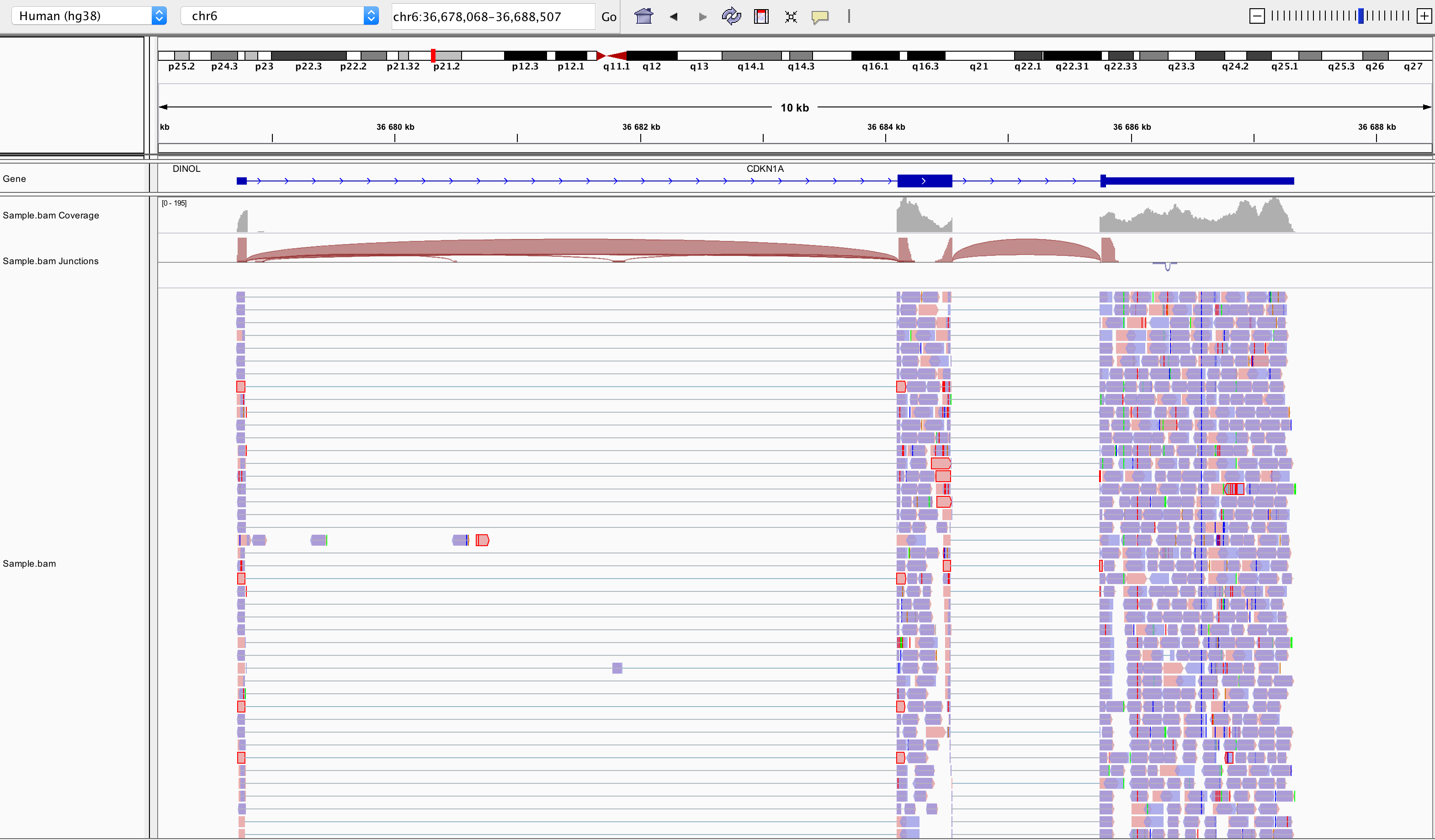
Loading a BAM file creates 3 associated tracks:
Coverage Track to view depth of coverage
Splice Junction Track which provides an alternative view of reads spanning splice junctions
Alignment Track to view individual aligned reads
Counting
Now comes the quantification step. It can be performed with several tools such as htseq-count or FeatureCounts. We will describe the latter as it runs much faster. It was developed for counting reads to genomic features such as genes, exons, promoters and genomic bins. FeatureCounts takes as input SAM/BAM files and an annotation file (such as a gtf file) containing chromosomal coordinates of features.
The Gene Transfer Format (GTF) is a widely used format for storing gene annotations. Human and mouse GTF files can be downloaded easily from Ensembl or from the UCSC table browser. The first few lines of gtf annotation file for human genome assembly GRCh38 look like this:
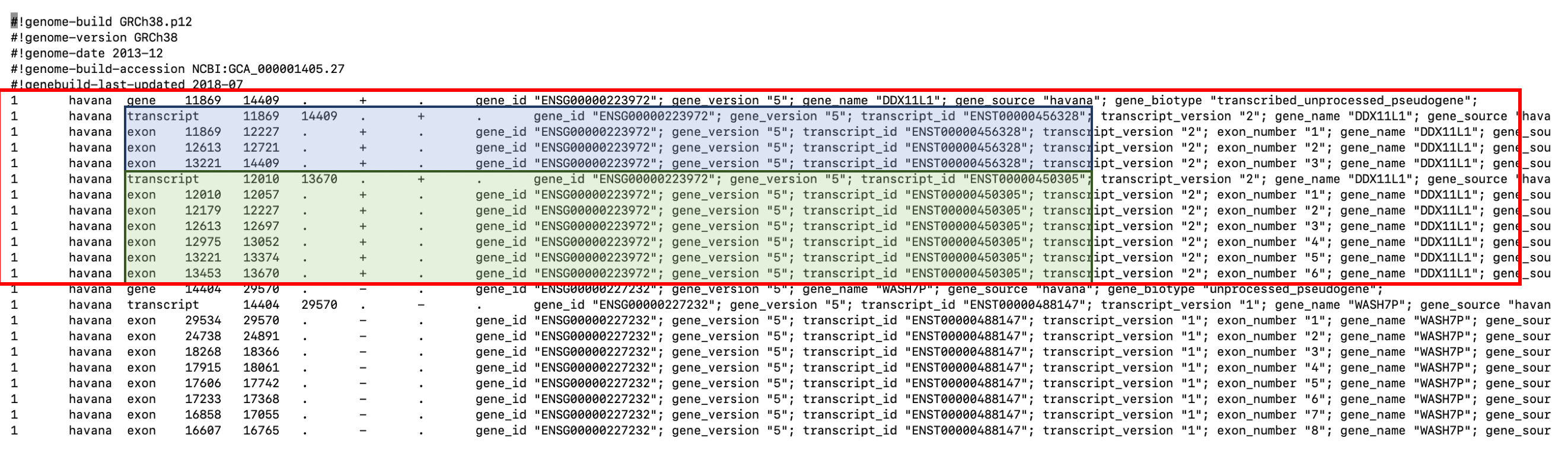
FeatureCounts will count the number of uniquely mapped reads assigned to features (e.g. an exon) or meta-features (e.g. a gene) of the gtf file. When summarizing reads at gene level, read counts obtained for exons belonging to the same gene will be added up to yield the read count for the corresponding gene. Note that an exon-spanning read will be counted only once for the corresponding gene even if it overlaps with more than one exon.
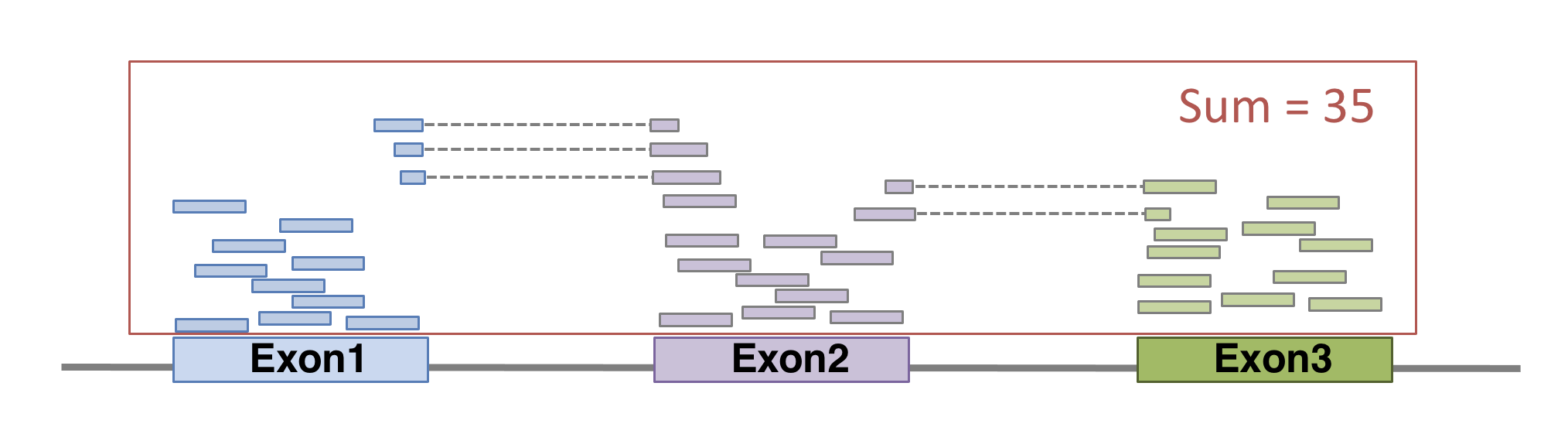
FeatureCounts could be launched with the following command. As usual, many of other parameters can be fine-tuned (see the manual for more details).
featureCounts \
-p \                        # paired-end
--countReadPairs \          # fragments counted instead of reads
-a annotations.gtf \        # name of the annotation file
-t exon \                   # feature type in GTF annotation
-g gene_id \                # Meta-features used in GTF annotation
-s 0 \                      # strand-specificity
-o SampleName_counts.tsv \  # Name of the output file
SampleName.bam              # bam file
The featurecounts output file will give us the raw counts of each gene in that sample. This is how the first lines of featurecounts output could look like:
OUTPUT
           Geneid                   Chr
1 ENSG00000223972     1;1;1;1;1;1;1;1;1
2 ENSG00000227232 1;1;1;1;1;1;1;1;1;1;1
3 ENSG00000278267                     1
4 ENSG00000243485             1;1;1;1;1
5 ENSG00000284332                     1
6 ENSG00000237613             1;1;1;1;1
                                                              Start
1             11869;12010;12179;12613;12613;12975;13221;13221;13453
2 14404;15005;15796;16607;16858;17233;17606;17915;18268;24738;29534
3                                                             17369
4                                     29554;30267;30564;30976;30976
5                                                             30366
6                                     34554;35245;35277;35721;35721
                                                                End
1             12227;12057;12227;12721;12697;13052;13374;14409;13670
2 14501;15038;15947;16765;17055;17368;17742;18061;18366;24891;29570
3                                                             17436
4                                     30039;30667;30667;31109;31097
5                                                             30503
6                                     35174;35481;35481;36073;36081
                 Strand Length sample.bam
1     +;+;+;+;+;+;+;+;+   1735          0
2 -;-;-;-;-;-;-;-;-;-;-   1351         14
3                     -     68          8
4             +;+;+;+;+   1021          0
5                     +    138          0
6             -;-;-;-;-   1219          0
Preparing the count matrix
The aim of an RNA-seq experiment is often to compare different types of cells, or to compare treated cells to control cells, to see if some genes are differentially expressed.
Once fastq files from each sample have been processed into raw counts, results can be merged in a single count matrix, were each column represents a sample, and each line represents a gene. This count matrix will be the starting point of a differential expression analysis.
R
counts <- read.csv("data/GSE96870_counts_cerebellum.csv",
                   row.names = 1)
head(counts)
OUTPUT
             GSM2545336 GSM2545337 GSM2545338 GSM2545339 GSM2545340 GSM2545341
Xkr4               1891       2410       2159       1980       1977       1945
LOC105243853          0          0          1          4          0          0
LOC105242387        204        121        110        120        172        173
LOC105242467         12          5          5          5          2          6
Rp1                   2          2          0          3          2          1
Sox17               251        239        218        220        261        232
             GSM2545342 GSM2545343 GSM2545344 GSM2545345 GSM2545346 GSM2545347
Xkr4               1757       2235       1779       1528       1644       1585
LOC105243853          1          3          3          0          1          3
LOC105242387        177        130        131        160        180        176
LOC105242467          3          2          2          2          1          2
Rp1                   3          1          1          2          2          2
Sox17               179        296        233        271        205        230
             GSM2545348 GSM2545349 GSM2545350 GSM2545351 GSM2545352 GSM2545353
Xkr4               2275       1881       2584       1837       1890       1910
LOC105243853          1          0          0          1          1          0
LOC105242387        161        154        124        221        272        214
LOC105242467          2          4          7          1          3          1
Rp1                   3          6          5          3          5          1
Sox17               302        286        325        201        267        322
             GSM2545354 GSM2545362 GSM2545363 GSM2545380
Xkr4               1771       2315       1645       1723
LOC105243853          0          1          0          1
LOC105242387        124        189        223        251
LOC105242467          4          2          1          4
Rp1                   3          3          1          0
Sox17               273        197        310        246
Genome indexing allows the aligner to quickly find potential alignment sites for query sequences in a genome, which saves considerable time during alignment. Frequently used genome (human, mouse, rat…) already have indexed versions that can be downloaded directly. When working with another reference genome, a specific indexed genome has to be built.↩︎
Indexing a BAM file allows IGV to quickly extract alignments overlapping particular genomic regions↩︎
Note that the index file must reside in the same directory as the bam file that it indexes, and it must have the same basename↩︎